advertisement
Last Update: (29/04/2017)
in ver 1.6. (usbarduinoVer2.3 Subver1.6 ) Fingering Learning Loop added.
App can be found at Google play with: "Low Cost EWI"
Update: (24/04/2017)
USBLowCostEWI app for tablet can be found at Google Play, starting from today.
Update: (20/04/2017)
Update 02:
usbarduinoVer2.3 Subver1.3 (Apr/20/2017)) - App for Prototype #03
This app generates sound in realtime instead of playing recorded .wav files. Now, with this software it is possible to change amplitude of sound (using pressure sensor in mouthpiece)
Now recalibration can be done with button on EWI and with button on tablet
old Update: (24/10/2015)
Price of parts (new calculation) :
List of parts:
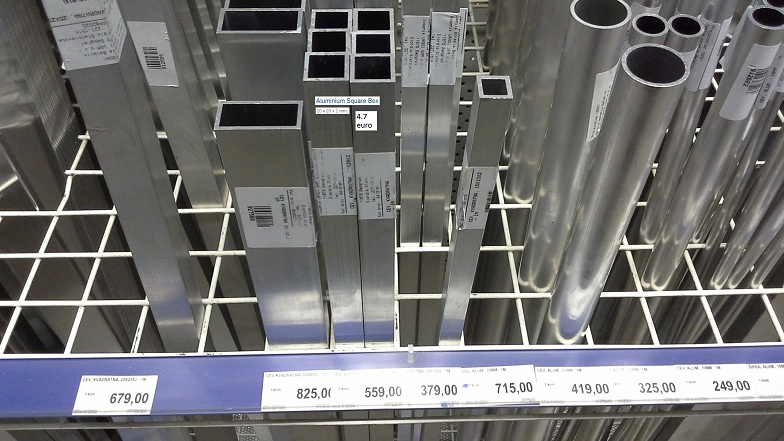
- Aluminium square box section (20mmx20mm x 2m - 1m long) 4.7euros
- Wires 2.7 euros
- Arduino uno (from dx.com) 6.33 euros
- BMP180 pressure sensor (from dx.com) 2.61 euros
- Experimental board 1 euro
- Transistors and resistors (all) 1 euro
- USB printer cable 2.25 euros
- Micro USB to USB Female 1.33 euros
- Syringe 5ml (for mouthpiece) - 0.05 euros
------------------------------------------------------------------
Total: 21.97 euros for all part
Update 01:
USBArdEWI.apk ver 2.3 (Oct/12/2015)) - App for Prototype #03
This app generates sound in realtime instead of playing recorded .wav files. Now, with this software it is possible to change amplitude of sound (using pressure sensor in mouthpiece)
Introduction (Prototype #03 - EWI with touch-sensitive keys and pressure sensor)
You want electric wind instrument but it is too expensive for you? Why don't you build it yourself? You need: a tablet or phone (android 4.2+) , Arduino UNO board (cca. 25 euros) , and some electronics components and aluminum square pipe (cca. 25 euros). Software for this you can download here for free (donation ware),
Here you can find all instructions for building low cost EWI by yourself.
Note 1: Before you start you should check whether your android device has usb host mode. If it has then you can establish usb connection with Arduino board.
Suggested app: USB Host Check
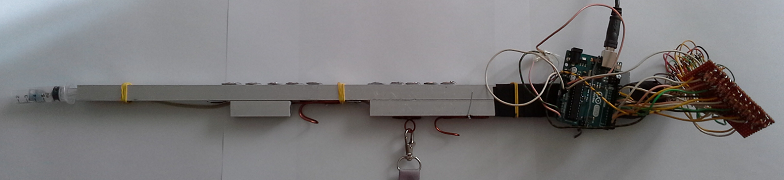
Hardware (electronics)
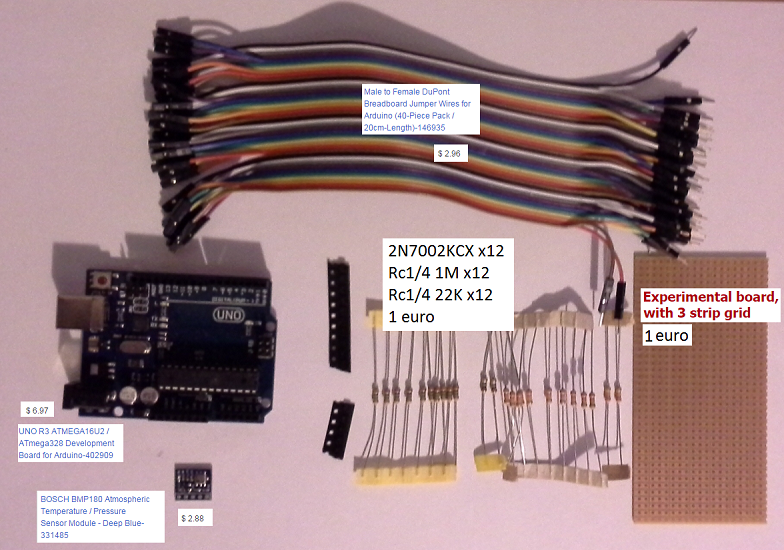
Hardware consists of:
- aluminum square pipe (14mm x 14mm, 1m long) for instrument body
- Arduino UNO board
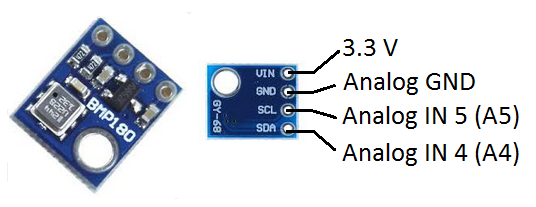
- 1 BMP180 temperature and barometric pressure sensor for Arduino UNO board
- resistors: 12x 22kΩ and 12x 1MΩ
- 12x FET transistors (2N7002KCX)
- wire to connect these components
- proto electric board
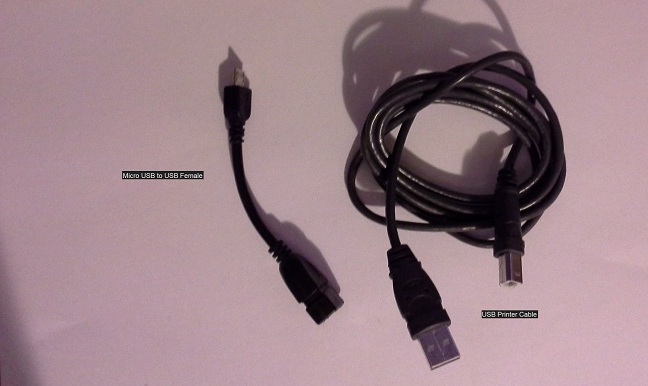
- USB printer cable (to connect arduino board with tablet)
- micro USB to female USB cable adapter (to connect USB printer cable with android device)
- or "micro USB to printer cable" instead of last two.
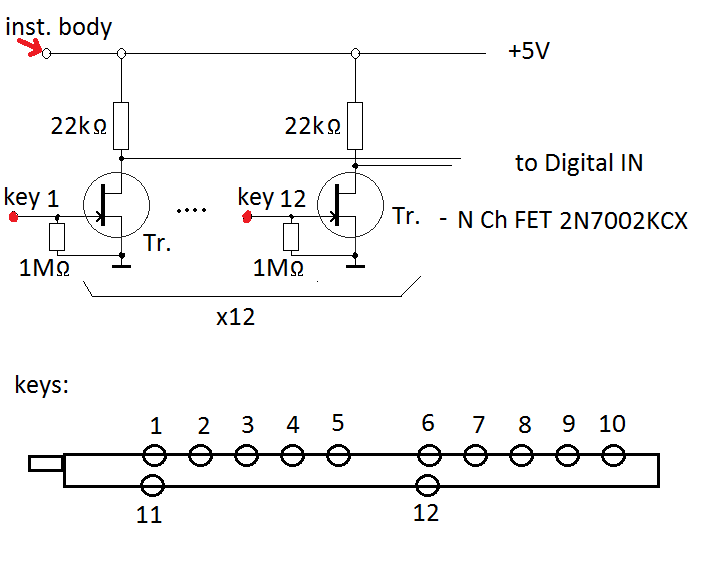
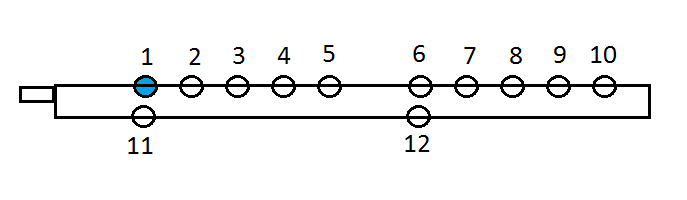
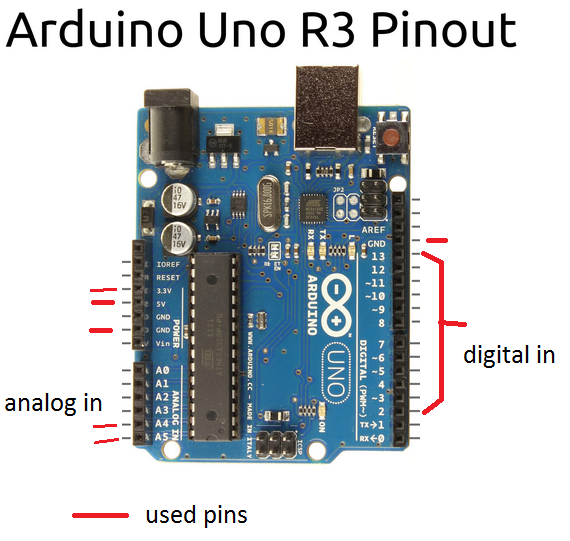
Pull-up resistors for key sensors - connect to digital pins 2 to 13 on arduino board. (key 1 to Dig in 2 ... key 12 to Dig in 13)
Connect pressure sensor to A4, A5, GND and 3.3V on Arduino UNO board
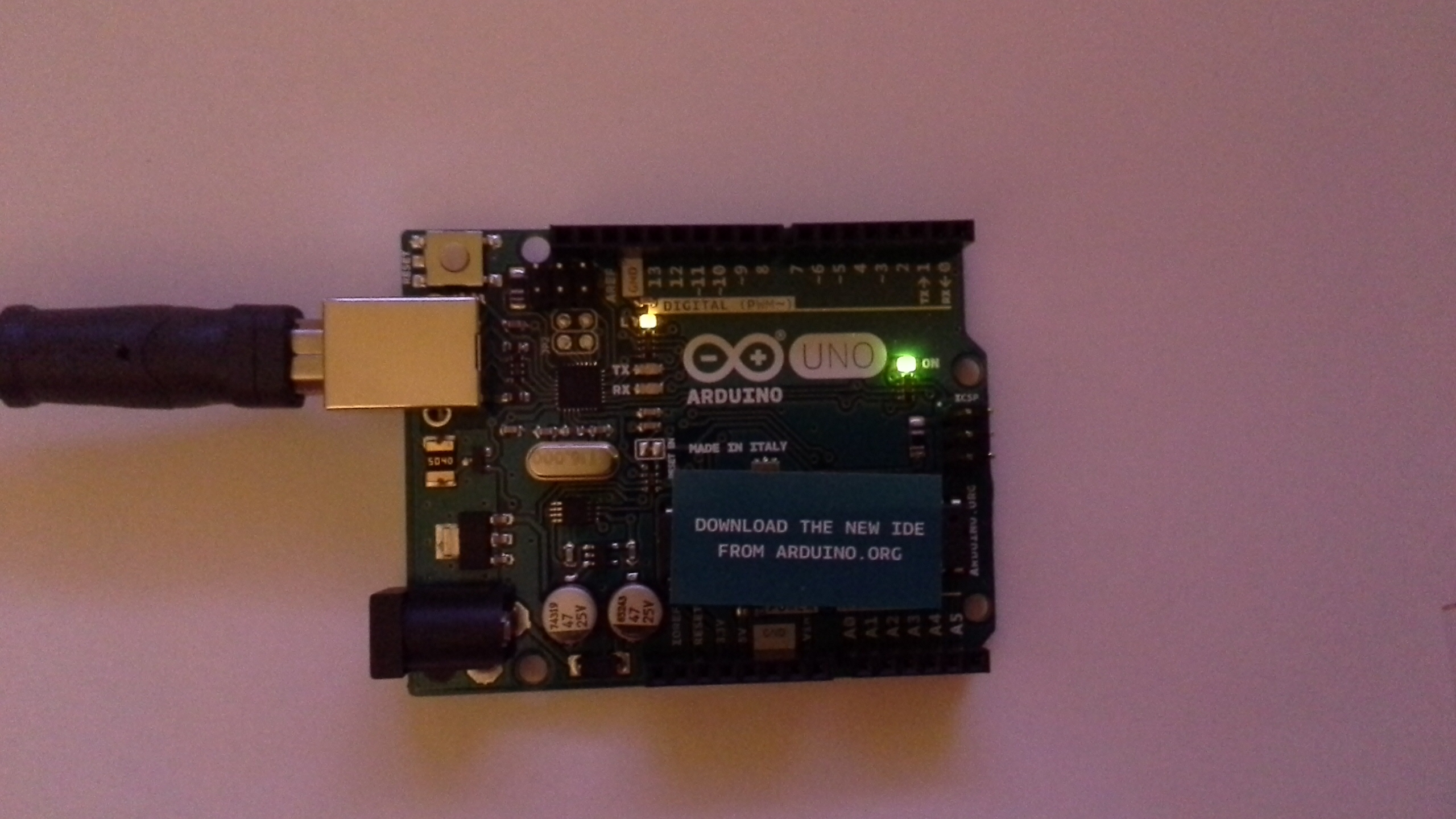
Arduino uno prototyping platform
Arduino uno board and program works in this way:
Board is constantly sampling 12 digital inputs and two analog input and these data are sent via Serial connection (115200 baud rate) over USB cable to android device and its application. Android app then plays notes on speaker/headphones.
Arduino uno has 14 digital inputs/outputs but only 12 can be used in this project because of Serial connection - when serial connection is used then digital pins 0 and 1 are not available.
Android tablet / phone
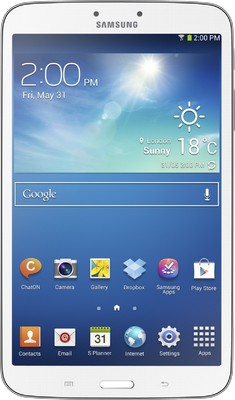
This prototype now works with Samsung galaxy tab 3 (t310) and it should be working with Androids 4.2+ but it should be checked first. Right now, the known problem is that Alcatel pop c3 can not recognize serial connection with arduino board (although application can be started on this phone). - See Note 1 in Introduction
Arduino uno program
USBArdEWI21.ino - App for Prototype #03
Download this program to Arduino Uno board to make it operational. It is possible to download this program from android device itself if you use ArduinoDroid android app.
You will also need library for bmp180 sensor to compile it. Link
Android app
USBArdEWI.apk ver 2.1 (Sept/12/2015)) - App for Prototype #03
This app work on android device. It is receiving data which arduino board sends and plays corresponding notes. Current version plays notes in this range: C3 to B7 (including these two notes)
USBArdEWI.apk ver 2.3 (Oct/12/2015)) - App for Prototype #03
This app generates sound in realtime instead of playing recorded .wav files. Now, with this software it is possible to change amplitude of sound (using pressure sensor in mouthpiece)
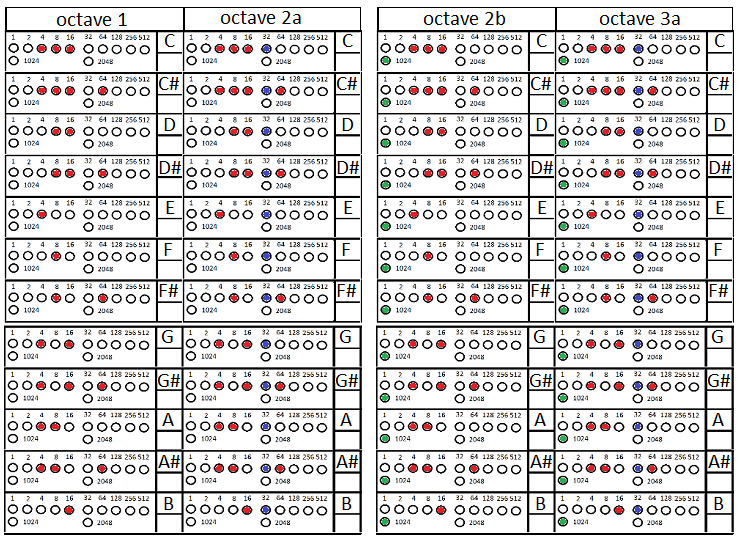
Fingering Chart
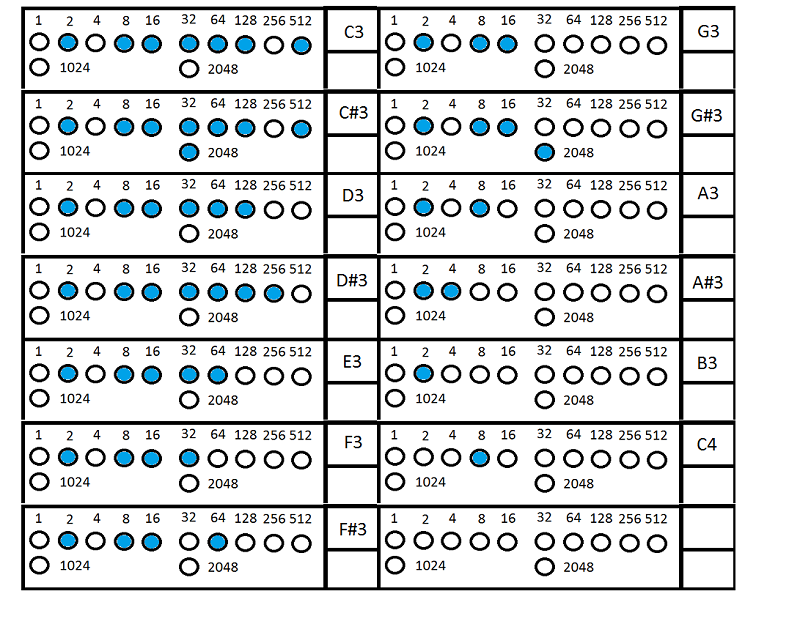
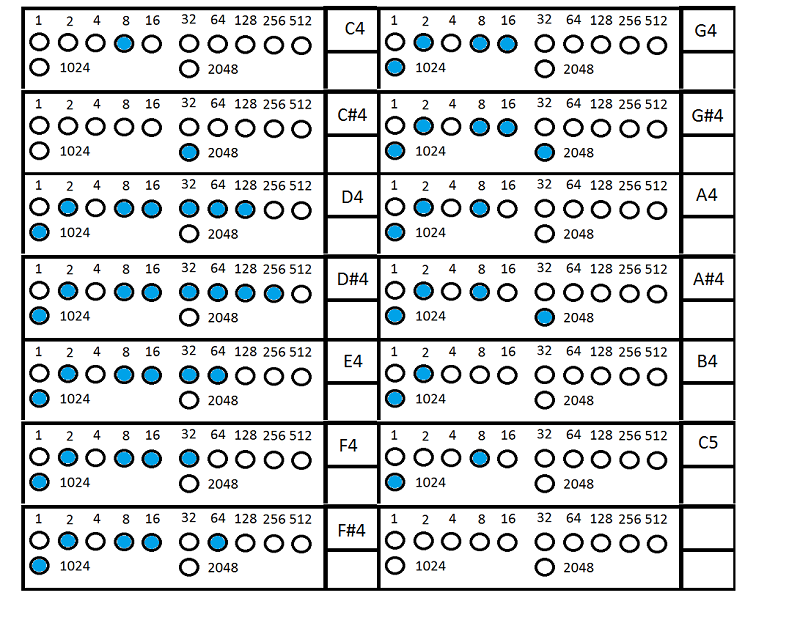
Fingering for this instrument, in prototype version 3.0, is made for 5 octaves (C3-B7 alto sax). In octaves 2, 3 and 4 each note can be played in two different ways. In later versions fingering could be customable.
// end of Prototype #03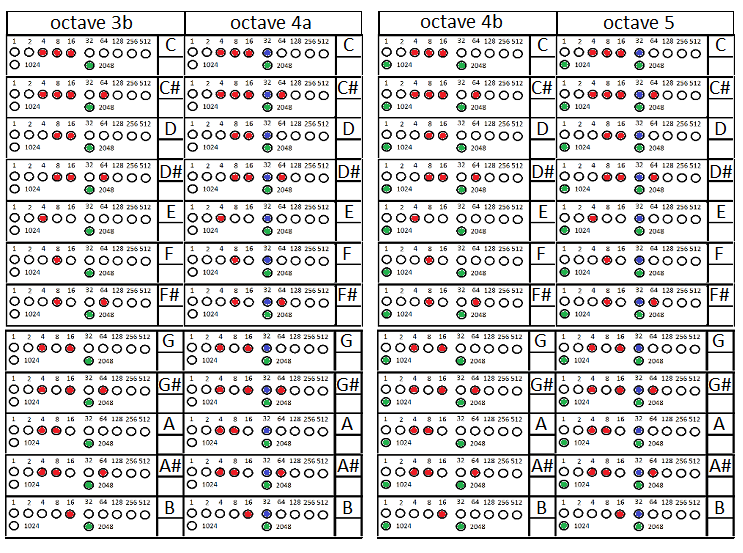
Introduction (Prototype #02 - EWI with touch-sensitive keys)
You want electric wind instrument but it is too expensive for you? Why don't you build it yourself? You need: a tablet or phone (android 4.2+) , Arduino uno board (cca. 25 euros) , and some electronics components and aluminum square pipe (cca. 25 euros). Software for this you can download here for free (donation ware),
Here you can find all instructions for building one (low cost EWI) by yourself.
Note 1: Before you start you should check whether your android device has usb host mode. If it has then you can establish usb connection with Arduino board.
Suggested app: USB Host Check
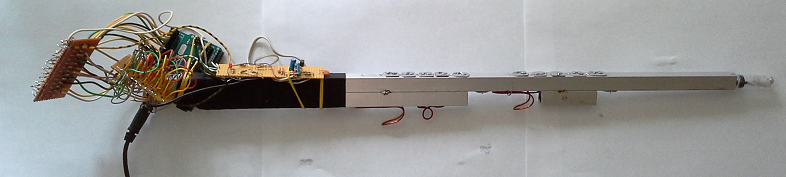
Hardware (electronics)
Hardware consists of:
- aluminum square pipe (14mm x 14mm, 1m long) for instrument body
- Arduino UNO board
- 1 microphone for mouthpiece (in next version this should be pressure sensor)
- resistors: 12x 22kΩ,12x 1MΩ, 2x 10kΩ and 1x 100kΩ
- capacitors: 2x 0.1uF
- one NPN transistor (BC107)
- 12x FET transistors (2N7002KCX)
- wire to connect these components
- proto electric board
- ac/dc adapter 9V (or 9V battery) for arduino board
- USB printer cable (to connect arduino board with tablet)
- micro USB to female USB cable adapter (to connect USB printer cable with android device)
- or "micro USB to printer cable" instead of last two.
Pull-up resistors for key sensors - connect to digital pins 2 to 13 on arduino board. (key 1 to Dig in 2 ... key 12 to Dig in 13)
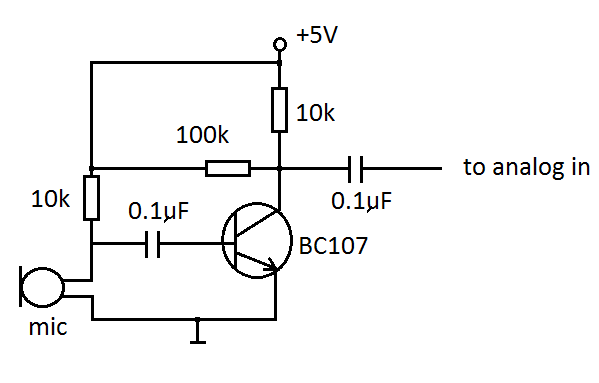
Circuit for microphone connect to A0 analog input on arduino board
Arduino uno prototyping platform
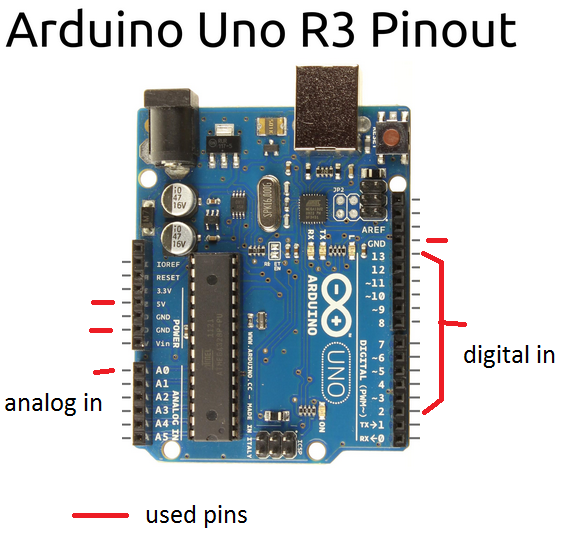
Arduino uno board and program works in this way:
Board is constantly sampling 12 digital inputs and one analog input and these data are sent via Serial connection (115200 baud rate) over USB cable to android device and its application. Android app then plays notes on speaker/headphones.
Arduino uno has 14 digital inputs/outputs but only 12 can be used in this project because of Serial connection - when serial connection is used then digital pins 0 and 1 are not available.
Android tablet / phone
This prototype now works with Samsung galaxy tab 3 (t310) and it should be working with Androids 4.2+ but it should be checked first. Right now, the known problem is that Alcatel pop c3 can not recognize serial connection with arduino board (although application can be started on this phone). - See Note 1 in Introduction
Arduino uno program
Download this program to Arduino Uno board to make it operational. It is possible to download this program from android device itself if you use ArduinoDroid android app.
Android app
USBArdEWI.apk ver 1.2 (Sept/4/2015)
This app work on android device. It is receiving data which arduino board sends and plays corresponding notes. Current version plays notes in this range: C3 to B7 (including these two notes)
Fingering Chart
Fingering for this instrument, in prototype version 2.0, is made for 5 octaves (C3-B7 alto sax). In octaves 2, 3 and 4 each note can be played in two different ways. In later versions fingering could be customable.
Old - Introduction (about Prototype #01 )
You want electric wind instrument but it is too expensive for you? Why don't you build it yourself? You need: a tablet or phone (android 4.2+) , Arduino uno board (cca. 25 euros) , and some electronics components and aluminum square pipe (cca. 25 euros). Software for this you can download here for free (donation ware),
Here you can find all instructions for building one (low cost EWI) by yourself.
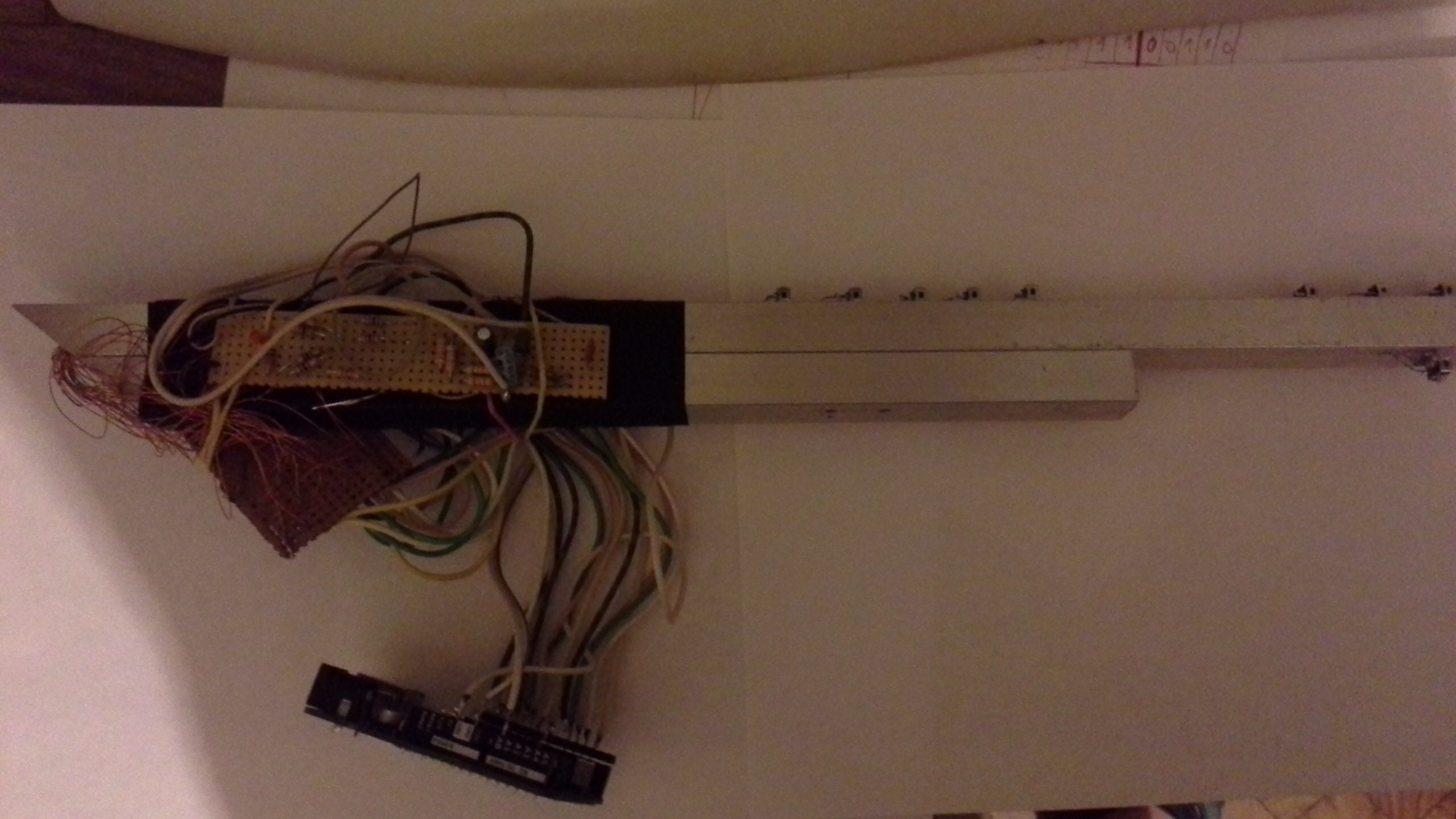
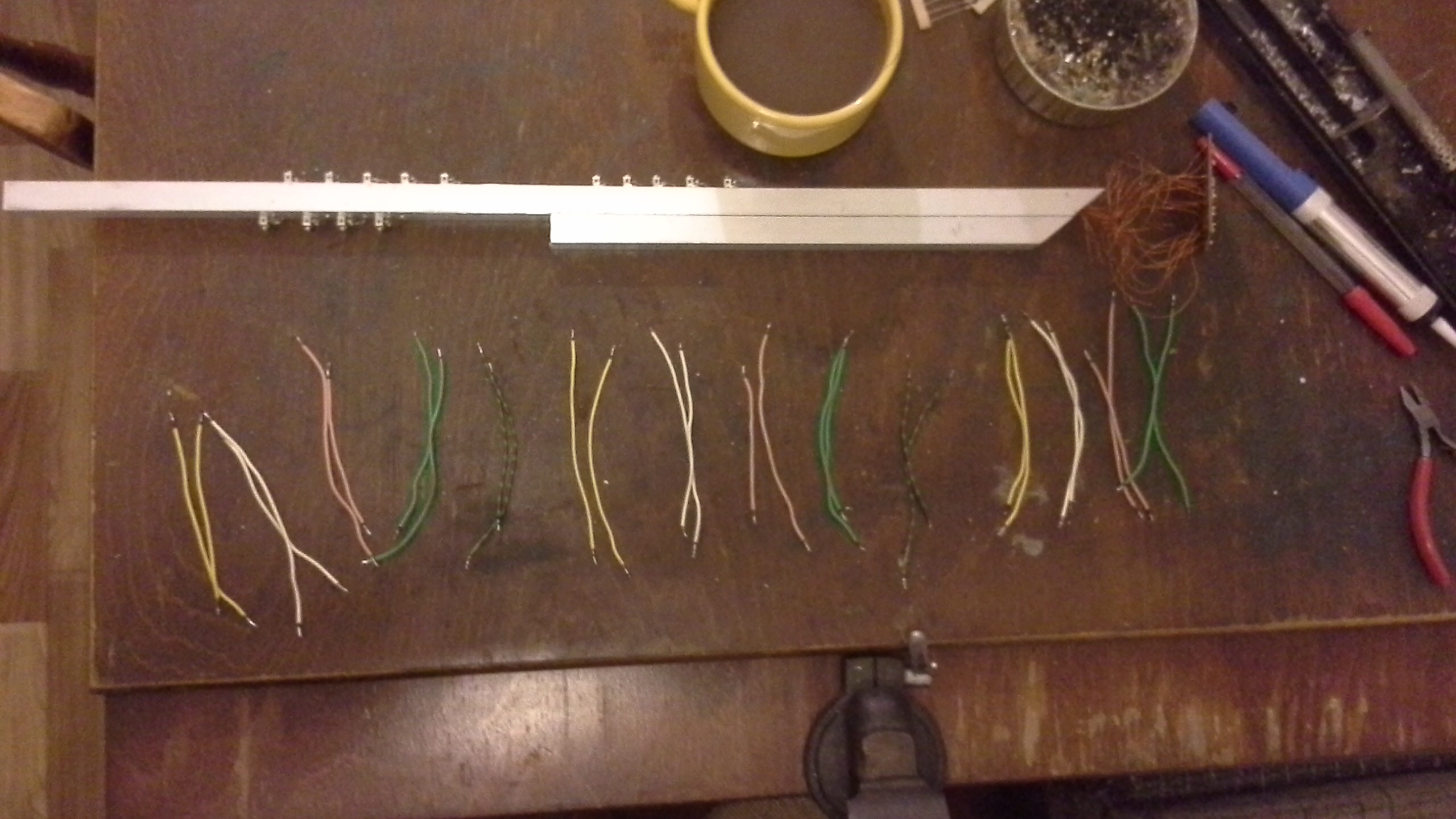
Hardware (electronics)
Hardware consists of:
- aluminum square pipe (14mm x 14mm, 60 cm long) for instrument body
- Arduino UNO board
- 12 push buttons for keys
- 1 microphone for mouthpiece (in next version this should be pressure sensor)
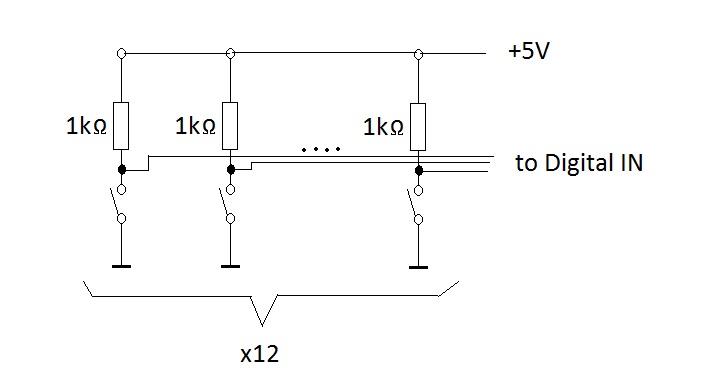
- resistors: 12x 1kΩ, 2x 10kΩ and 1x 100kΩ
- capacitors: 2x 0.1uF
- one NPN transistor (BC107)
- wire to connect these components
- proto electric board
- ac/dc adapter 9V (or 9V battery) for arduino board
- USB printer cable (to connect arduino board with tablet)
- micro USB to female USB cable adapter (to connect USB printer cable with android device)
- or "micro USB to printer cable" instead of last two.
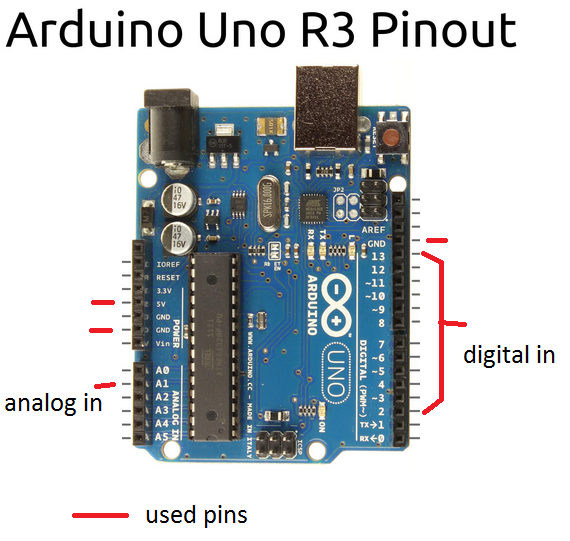
Pull-up resistors for push buttons - connect to digital pins 2 to 13 on arduino board.
Circuit for microphone connect to A1 analog input on arduino board
Arduino uno prototyping platform
Arduino uno board and program works in this way:
Board is constantly sampling 12 digital inputs and one analog input and these data are sent via Serial connection (115200 baud rate) over USB cable to android device and its application. Android app then plays notes on speaker/headphones.
Arduino uno has 14 digital inputs/outputs but only 12 can be used in this project because of Serial connection - when serial connection is used then digital pins 0 and 1 are not available.
Android tablet / phone
This prototype now works with Samsung galaxy tab 3 (t310) and it should be working with Androids 4.2+ but it should be checked first. Right now, the known problem is that Alcatel pop c3 can not recognize serial connection with arduino board () although application can be started on this phone.
Arduino uno program
Download this program to Arduino Uno board to make it operational. It is possible to download this program from android device itself if you use ArduinoDroid android app.
Android app
This app work on android device. It is receiving data which arduino board sends and plays corresponding notes. Current version plays notes in this range: C3 to B4 (including these two notes)
Fingering Chart
Fingering for this instrument, in this prototype version, should resemble fingering for saxophone. In later versions fingering could be customable.
If the future version of this device is made with Arduino Mega 2560 Rev3 board (which cost more but offers more digital inputs) a instrument with 18-21 keys could be made (not only with 12 keys)
. .